Claims Management Using Dyrect
Claims management covers the process used to receive a customer's product issue, verify warranty eligibility, assign responsibility, select a resolution, complete service activity, communicate progress, and close the request with a documented outcome.
Dyrect connects each claim with the relevant customer, product, serial number, purchase evidence, warranty registration, communication, repair or replacement record, work order, and service history. This connection allows support and service teams to review the complete context before approving an action.
For the wider warranty lifecycle, return to Warranty Management Using Dyrect. For registration, approval, certificates, imports, and registration corrections, read Warranty Registration Using Dyrect.
Documentation index
| Task or topic | Section |
|---|---|
| Understand the complete claim process | Claim lifecycle |
| Understand the records used for a claim | Records connected to a claim |
| Prepare policies, roles, and service operations | Requirements before accepting claims |
| Understand customer claim submission | Claim intake channels |
| Create or review a support ticket | Support ticket management |
| Review claim evidence | Evidence and attachments |
| Verify warranty coverage | Warranty eligibility validation |
| Assign ownership and priority | Assignment, priority, and escalation |
| Understand claim stages | Claim and ticket statuses |
| Approve, reject, or request information | Claim decisions |
| Communicate with customers and internal teams | Communication and internal notes |
| Create and manage repairs | Repair orders |
| Create and manage replacements | Replacement orders |
| Process refunds or other outcomes | Other resolution types |
| Track service execution | Work order management |
| Use service centres | Service-centre management |
| Manage charges, estimates, and quotations | Billing and financial information |
| Track shipments | Shipment and product movement |
| Complete and close a claim | Resolution and closure |
| Resolve common claim problems | Claim exceptions |
| Provide customer tracking | Customer portal and status visibility |
| Connect Shopify and other systems | Integrations and synchronization |
| Measure service performance | Claims reporting and analytics |
| Follow an operating process | Recommended claims operating process |
| Validate the program before publication | Claims workflow quality review |
| Find related procedures | Related Dyrect guides |
Claim lifecycle
A claim begins when a customer or authorized team member reports a product issue. Dyrect records the request as a support ticket and links it to the relevant product and warranty information. The support team then validates eligibility, determines the appropriate outcome, and tracks service activity through completion.
Every decision should remain traceable through ticket activity, communication, evidence, approval history, work-order activity, and the final resolution.
Records connected to a claim
Claims administration uses several related records. Each record carries a different part of the service history.
| Record | Information retained | Use in the claims process |
|---|---|---|
| Customer | Name, contact information, address, registered products, and prior requests | Identifies the claimant and communication recipient |
| Product | Product name, model, SKU, variant, category, and warranty terms | Identifies the affected item and applicable policy |
| Warranty registration | Warranty ID, status, coverage dates, purchase details, serial number, and attachments | Supports ownership and coverage verification |
| Support ticket | Issue, category, priority, assignee, evidence, communication, status, and activity | Organizes claim review and responsibility |
| Repair order | Repair type, reason, description, service items, charges, and customer message | Records an approved repair |
| Replacement order | Returned item, replacement item, reason, charges, and customer message | Records an approved replacement |
| Work order | Assigned service activity, related ticket, warranty, shipment, status, and activity | Tracks execution of the approved service |
| Resolution | Decision, outcome, completion evidence, customer confirmation, and closure reason | Documents the completed claim |
A customer message alone provides only part of the claim history. The support ticket should retain the issue, evidence, decision, service action, and closure information.
Requirements before accepting claims
Claims should be governed by documented policy and operational rules. Confirm these requirements before publishing a claim form or customer portal.
| Requirement | Information to confirm |
|---|---|
| Warranty policy | Covered defects, exclusions, coverage period, customer obligations, and claim submission period |
| Eligibility rules | Product identity, serial number, purchase proof, purchase channel, registration, and prior claim requirements |
| Claim form | Issue categories, description fields, evidence fields, contact information, product selection, and consent |
| Ticket categories | Product issue, repair request, replacement request, installation concern, missing part, or other approved categories |
| Status process | New, review, information request, approved, rejected, assigned, service in progress, resolved, and closed stages |
| Priority policy | Criteria for standard, elevated, urgent, safety-related, or business-defined priorities |
| Assignment rules | Team, product, issue, region, dealer, or service-centre routing |
| Resolution policy | Repair, replacement, refund, parts dispatch, technical guidance, or another configured outcome |
| Service network | Authorized service centres, locations, capabilities, contacts, and assignment rules |
| Communication | Acknowledgement, information request, approval, rejection, service update, completion, and closure messages |
| Reporting | Service-level measures, approval authority, escalation thresholds, and review frequency |
Support, operations, finance, warehouse, dealer, and service-centre responsibilities should be documented for each outcome.
Claim intake channels
Dyrect can receive claims through branded digital forms or a customer portal. An authorized team member can also create a support ticket when a request arrives through an approved service channel.
Customer portal or digital form
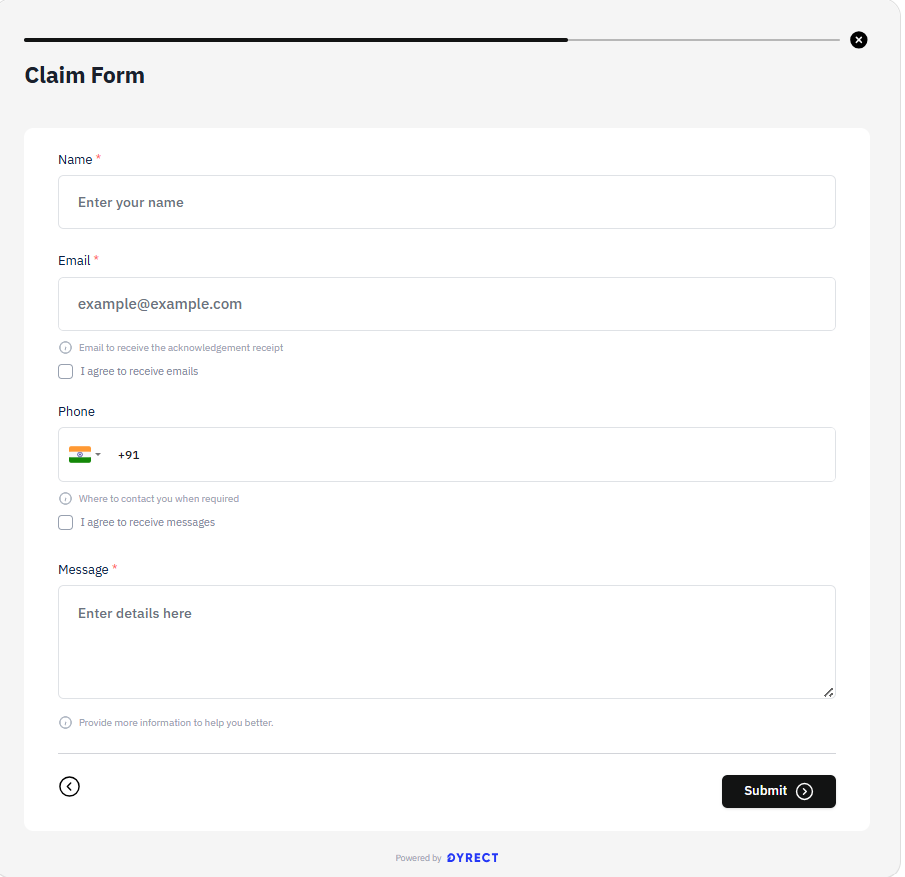
The customer selects the relevant registered product or provides product identity information. The form can collect:
- Customer name and contact information
- Product and model
- SKU or variant
- Serial number
- Warranty ID
- Purchase date
- Invoice or receipt
- Issue category
- Issue description
- Images, videos, or documents
- Preferred contact method
- Address or service location
- Policy consent
The form should explain the accepted evidence formats and the next stage after submission. Customers should receive a claim or ticket reference.
Team-created support ticket
An authorized support user can create a ticket for a request received through an approved communication channel. The user should capture the customer's original description, link the correct customer and product, attach all received evidence, and record the source channel.
Claim identification
Each claim should have a unique ticket reference. Use this reference in customer messages, internal notes, work orders, shipment activity, quotations, and closure communication.
Support ticket management
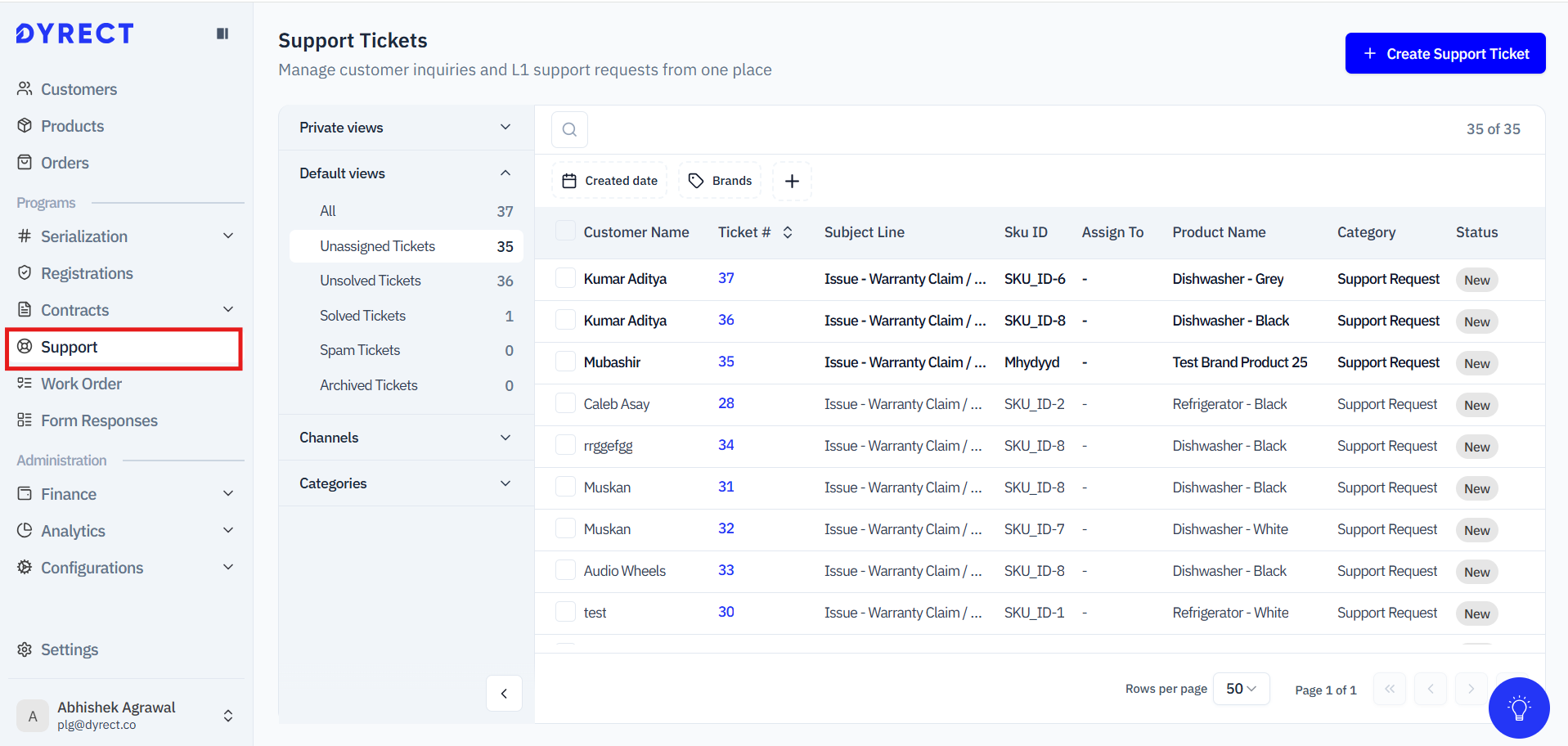
The Support Tickets area provides a shared view of customer requests. The list can display:
- Customer name
- Ticket number
- Subject
- SKU
- Assignee
- Product name
- Category
- Status
- Priority
- Registered by
- Invoice
- Quotation
Open a ticket to review its connected information. The ticket view can include the following sections:
| Section | Information |
|---|---|
| Overview | Customer issue, assignee, status, priority, customer details, product, and warranty |
| Communication | Customer replies, team replies, forwarded messages, and communication history |
| Billing | Estimates, quotations, invoices, charges, or payment-related information |
| Work Order | Repair, replacement, service assignment, and work-order progress |
| Resolution | Approved outcome, completion information, and closure details |
| Activity | Status updates, assignment updates, notes, actions, and timestamps |
Reviewing a new ticket
Use a consistent review sequence:
- Confirm the customer identity and contact information.
- Read the complete issue description.
- Confirm the affected product and SKU.
- Link the correct warranty registration when available.
- Review the warranty status and expiry date.
- Review the serial number and purchase information.
- Review all images, videos, invoices, and documents.
- Select the correct category and priority.
- Assign the ticket to the responsible user or team.
- Record the next action and customer update.
The initial review should identify missing information before a repair, replacement, or financial action begins.
Evidence and attachments
Evidence supports issue diagnosis, eligibility review, and resolution approval. Required evidence should align with the product category and warranty policy.
Common evidence includes:
- Invoice or receipt
- Product serial-number image
- Product label image
- Image of the reported defect
- Video showing the issue
- Packaging image
- Installation information
- Diagnostic report
- Dealer confirmation
- Service-centre assessment
- Shipment receipt
Review evidence for readability, product match, purchase match, date, consistency, and signs of alteration. Record the specific missing item when requesting additional evidence.
Sensitive customer and payment information should remain protected according to the organization's data policy.
Warranty eligibility validation
Eligibility validation confirms whether the reported issue qualifies for service under the applicable policy.
Validation sequence
- Confirm the product identity.
- Confirm the serial number or QR identity when serialization applies.
- Confirm the claimant matches the owner or permitted representative.
- Confirm the purchase record and sales channel.
- Confirm the warranty start date and end date.
- Confirm the warranty status.
- Confirm the issue occurred within the eligible period.
- Compare the issue with covered conditions and exclusions.
- Review previous claims, repairs, replacements, and ownership activity.
- Record the eligibility decision and supporting evidence.
Registration and claim eligibility
A warranty registration can provide customer, product, serial, purchase, and coverage information for claim review. Account policy determines whether registration is mandatory for service or whether eligibility can be established through other accepted evidence.
Serial-number review
The serial number should match the product or SKU, authorized serial source, customer ownership record, and claim history. Duplicate usage or a mismatched product requires additional review.
Proof-of-purchase review
The invoice or order record should identify the purchased product, date, seller, and customer according to policy. Verify that the purchase date supports the recorded coverage period.
Assignment, priority, and escalation
Assignment identifies the user, team, dealer, or service centre responsible for the next action. Priority indicates the required response level.
Claims can be assigned according to:
- Product or product category
- Issue type
- Region
- Sales channel
- Dealer
- Service-centre capability
- Language
- Priority
- Team workload
- Required approval level
Priority rules should define response targets and escalation points. Safety concerns, regulatory issues, repeated product failures, widespread batch issues, and high-impact customer situations may require elevated review.
When responsibility moves between teams, record the new assignee, transfer reason, pending action, required completion date, and latest customer update.
Claim and ticket statuses
Statuses should indicate the current operational stage and required action. Available labels depend on account configuration.
| Status | Meaning | Required action |
|---|---|---|
| New | Ticket received and awaiting initial review | Review, categorize, prioritize, and assign |
| Under review | Eligibility or issue assessment is in progress | Complete validation and record findings |
| Information required | Customer, dealer, or service partner must provide information | Record requested evidence and follow-up date |
| Approved | Claim qualifies for the selected outcome | Create the relevant repair, replacement, refund, or service action |
| Rejected | Claim fails the applicable policy | Record reason and communicate decision |
| Assigned | A user, team, dealer, or service centre owns the next action | Monitor acknowledgement and progress |
| Repair in progress | Repair activity has started | Track work order, parts, charges, and updates |
| Replacement in progress | Replacement activity has started | Track returned item, replacement item, and shipment |
| Resolved | Approved service or outcome has been completed | Confirm evidence and customer communication |
| Closed | Administrative review and communication are complete | Preserve final resolution and closure reason |
Define which roles can move a ticket between stages. Status updates should trigger the relevant internal task and customer message.
Claim decisions
Every decision should reference the policy, evidence, and authorized approver.
Request additional information
Use an information request when missing evidence can complete the review. Identify the required item, accepted format, submission method, and response period.
Approve
Approve the claim after confirming eligibility and the selected outcome. Record:
- Approved resolution
- Approval reason
- Approver
- Approval date
- Customer obligation
- Business obligation
- Charges when applicable
- Service centre or responsible team
- Expected next stage
Reject
Reject the claim when it fails the applicable policy and additional evidence cannot establish eligibility. Common reasons include expired coverage, excluded damage, invalid serial number, purchase mismatch, altered evidence, duplicate claim, unauthorized modification, or missing mandatory evidence after the permitted response period.
The rejection message should identify the policy reason, ticket reference, decision date, and available escalation route.
Resolution selection
| Condition | Possible outcome |
|---|---|
| Defect can be corrected through authorized service | Repair |
| Product meets replacement criteria | Replacement |
| Policy permits reimbursement | Refund |
| Individual component requires dispatch | Parts replacement |
| Issue can be corrected through guided assistance | Technical guidance |
| Issue falls outside coverage | Paid service or rejection according to policy |
The authorized policy determines the final outcome.
Communication and internal notes
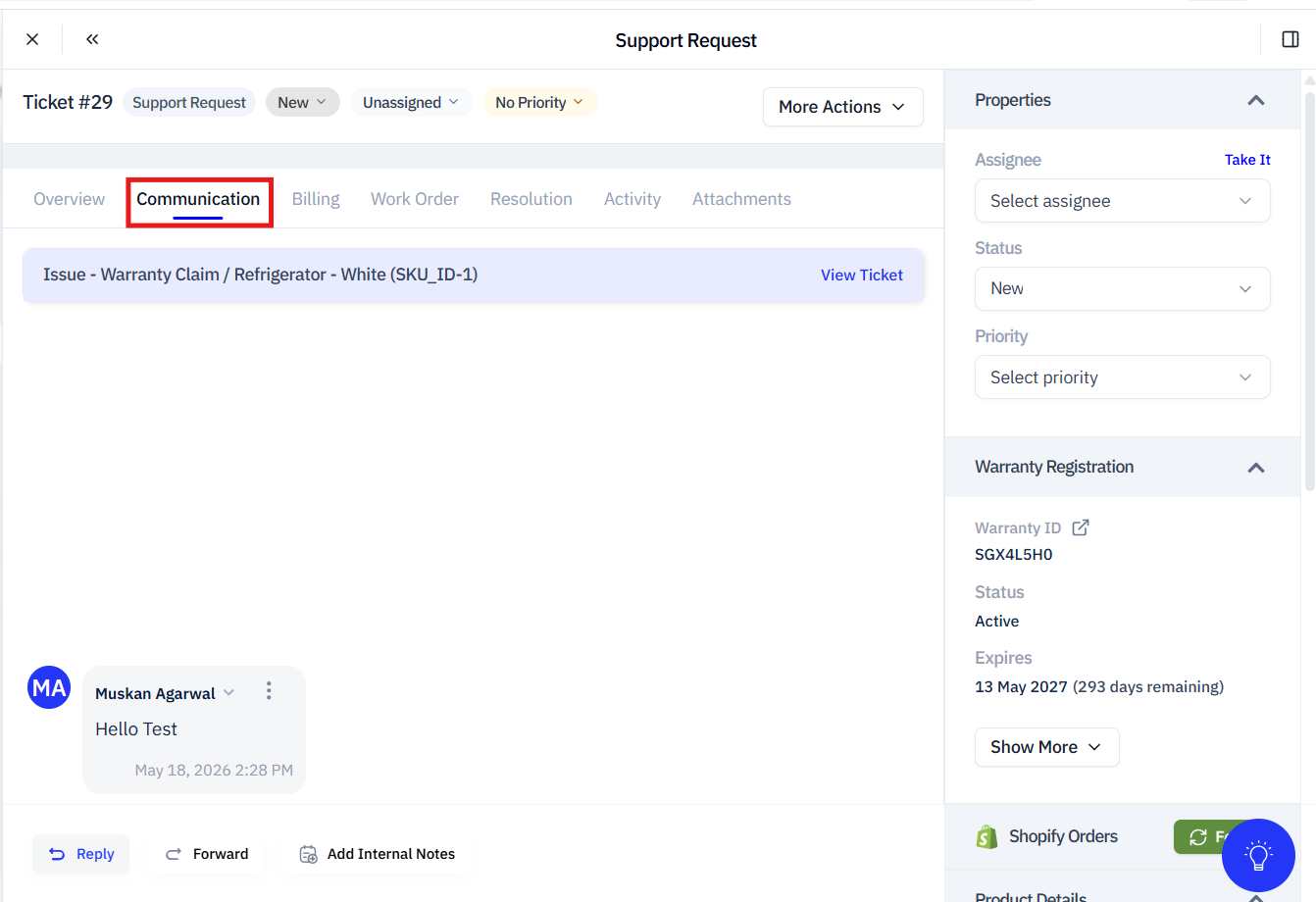
Customer communication and internal collaboration should remain attached to the ticket.
Customer communication
Customers should receive updates for significant events:
- Claim received
- Ticket reference created
- Claim under review
- Additional information required
- Claim approved
- Claim rejected
- Service assigned
- Repair in progress
- Replacement approved
- Shipment dispatched
- Service completed
- Claim resolved
- Claim closed
Each message should identify the ticket reference, current stage, customer action, business action, and expected next update.
Internal notes
Internal notes support collaboration among support, operations, finance, warehouse, dealer, and service teams. Notes can record diagnosis, policy interpretation, approval context, service-centre feedback, parts information, shipment issues, or escalation details.
Internal notes should use factual language and remain separate from customer-facing replies.
Repair orders
A repair order records an approved repair outcome and the items required to complete it. Use Create a Repair Order for the current procedure.
Repair information
The repair form can include:
- Repair type: free or paid
- Repair reason
- Description
- Product
- Service or parts table
- Payment terms
- Item details
- Quantity
- Rate
- Total
- Customer email option
Free repair should be selected when the applicable policy covers the service. Paid repair should be selected when customer payment applies and the policy permits that outcome.
Creating a repair order
Before creation, confirm the approved ticket, affected product, warranty status, repair type, service location, parts requirements, charges, and customer communication.
After creation, verify that the repair remains linked to the correct ticket, customer, product, warranty, and work order. Record technician updates, parts used, diagnostic findings, completion evidence, and customer communication.
Repair completion
Confirm the completed service, completion date, technician or service centre, parts used, charges, product condition, test result, and return or delivery information. Update the work order and ticket before claim closure.
Replacement orders
A replacement order records the return of the affected product and the product supplied as the approved replacement. Use Create a Replacement Order for the current procedure.
Replacement information
The replacement form can include:
- Returned item
- Reason for replacement
- Description
- Replacement item
- Product and SKU
- Payment terms
- Item details
- Quantity
- Rate
- Total
- Customer email option
Replacement validation
Before creation, confirm:
- Ticket approval
- Replacement eligibility
- Returned product and serial number
- Replacement product and SKU
- Stock or fulfilment availability
- Price or charge treatment
- Return requirement
- Shipment address
- New serial number when applicable
- Coverage treatment for the replacement
Replacement completion
Record the returned-item status, replacement-item identity, dispatch information, delivery information, new serial number, and revised warranty relationship. Confirm whether the replacement inherits the existing coverage end date or receives another policy-defined period.
Other resolution types
Account configuration and policy can permit outcomes beyond repair or replacement.
Refund
A refund outcome should record the approved amount, currency, payment source, approving user, customer confirmation, transaction reference, and completion date.
Parts dispatch
Record the part, quantity, product compatibility, shipment information, installation responsibility, and completion confirmation.
Technical guidance
Record the instructions provided, diagnostic result, customer confirmation, and any follow-up requirement.
Paid service
Record the estimate, customer approval, payment terms, parts or service items, assigned provider, and completion evidence.
Work order management
A work order tracks the operational activity required to complete an approved service outcome.
The work-order list can help teams monitor assignment, status, service type, customer, product, and outstanding activity. A work-order detail view can contain:
- Work-order number
- Status
- Repair or replacement item
- Service type
- Reason
- Description
- Parts or service items
- Quantity
- Rate
- Total
- Source order
- Shipment information
- Related ticket
- Related warranty
- Serial number
- Warranty expiry
- Activity history
- Email action
- Edit action
Work-order process
- Create the work order from the approved claim outcome.
- Link the relevant ticket, warranty, customer, and product.
- Assign the responsible team or service centre.
- Record required parts, services, charges, and shipment activity.
- Update status when activity begins, pauses, resumes, or completes.
- Record diagnostic and service information.
- Communicate significant progress to the customer.
- Confirm completion evidence.
- Update the related ticket and resolution.
Work-order status and ticket status should remain aligned. A completed work order should lead to resolution review rather than automatic ticket closure when customer confirmation or financial action remains pending.
Service-centre management
Service centres can inspect, diagnose, repair, or otherwise service products according to their authorization and capability.
Use Add Service Centres to configure authorized centres.
Service-centre records should include location, contact information, supported products, service capabilities, operating region, assignment rules, and active status.
When assigning a claim or work order, confirm the centre can service the product and resolution type. Record dispatch, receipt, diagnosis, estimate, approval, service progress, completion, and return information.
Billing and financial information
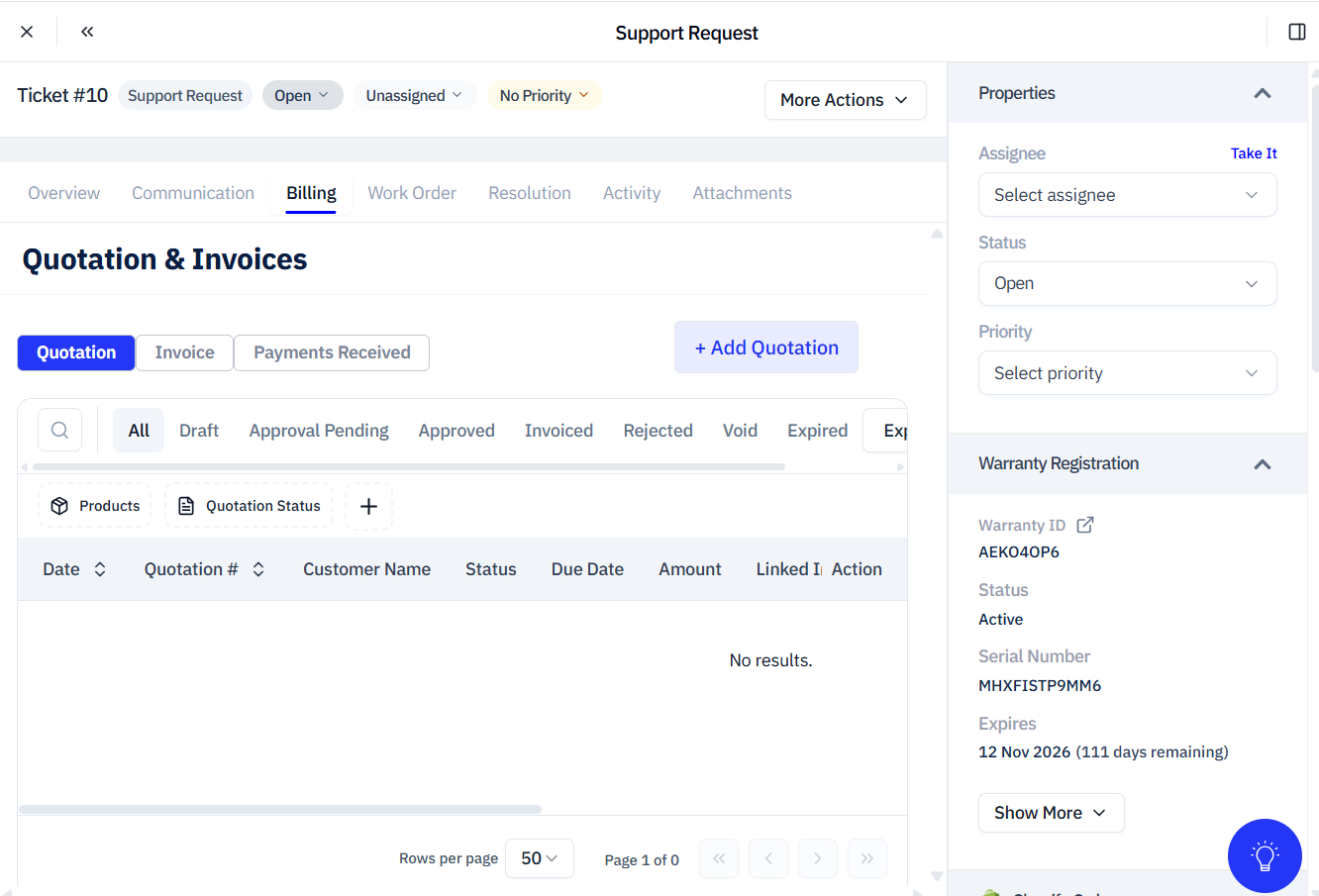
The ticket and service process can include estimates, quotations, invoices, payment terms, parts, labour, taxes, adjustments, dealer reimbursement, or other configured financial information.
Financial activity should remain linked to the ticket and approved outcome. Confirm authorization before communicating charges or creating paid service.
Record:
- Estimate or quotation reference
- Parts and service items
- Quantity
- Rate
- Taxes or adjustments
- Total
- Payment terms
- Customer approval
- Invoice reference
- Payment status
- Reimbursement or payout reference
Financial completion may be required before closure for paid service, refunds, dealer reimbursements, or service-centre payments.
Shipment and product movement
Repair and replacement processes can involve collection, return, service-centre delivery, replacement dispatch, or customer delivery.
Shipment records should contain:
- Shipment type
- Origin
- Destination
- Carrier
- Tracking reference
- Dispatch date
- Delivery date
- Product and serial number
- Package condition
- Delivery confirmation
- Exception information
The ticket, work order, and customer message should reflect significant shipment events. A shipment delay should have an assigned owner and follow-up date.
Resolution and closure
Resolution confirms that the approved outcome has been completed. Closure confirms that the administrative and communication requirements have also been completed.
Before resolving a claim, confirm:
- Approved outcome completed
- Work order completed
- Repair or replacement information recorded
- Financial action completed when applicable
- Shipment delivered when applicable
- Product identity and serial history updated
- Completion evidence attached
- Customer informed
- Remaining action assigned
Before closing a claim, confirm the final resolution, closure reason, completion date, customer response, service history, and activity record.
If the customer reports that the issue remains unresolved, reopen or create the applicable follow-up process according to policy.
Claim exceptions
Use documented rules for recurring claim exceptions.
| Exception | Review | Resolution |
|---|---|---|
| Warranty registration unavailable | Review purchase evidence, product identity, serial number, and policy | Establish eligibility through the accepted process or reject |
| Expired warranty | Confirm coverage dates and extended-coverage records | Offer an authorized paid service, policy exception, or rejection |
| Serial number mismatch | Compare product, SKU, serial source, registration, and product label | Correct verified data or reject an ineligible product |
| Missing purchase evidence | Review order system, dealer record, or other accepted source | Request accepted evidence or reject according to policy |
| Duplicate claim | Compare issue, product, serial number, customer, date, and prior ticket | Continue the existing ticket or close the duplicate |
| Repeat failure after repair | Review previous repair, parts, technician findings, and policy | Reopen service, escalate, or select another authorized outcome |
| Replacement unavailable | Review approved alternatives, stock, model compatibility, and policy | Select an authorized equivalent, refund, or delayed fulfilment |
| Customer unreachable | Review communication attempts and response period | Apply the documented follow-up and closure rule |
| Service-centre delay | Review assignment, parts, workload, and estimated completion | Escalate, reassign, or communicate a revised date |
| Shipment lost or damaged | Review carrier evidence, custody, product identity, and insurance | Open the approved shipment exception process |
| Safety concern | Review product, batch, issue evidence, and escalation policy | Apply urgent escalation and required regulatory procedure |
Every exception should identify the owner, action, due date, evidence, customer update, and escalation stage.
Customer portal and status visibility
The customer portal can provide access to registered products, warranty information, claim submission, attachments, ticket status, service updates, and resolution history.
Customer-visible statuses should use language aligned with the actual service stage. Internal operational detail can remain restricted when required.
Portal information can include:
- Ticket reference
- Product
- Submitted issue
- Current status
- Requested customer action
- Repair or replacement progress
- Shipment information
- Completion message
- Previous claims
Accurate portal updates reduce repeated enquiries and provide a consistent customer record.
Integrations and synchronization
Integrations can connect claims with ecommerce, communication, support, CRM, shipping, payment, fulfilment, and marketing systems.
Shopify-linked customer, product, and order information can support claim validation. Work-order status synchronization can align service activity across connected systems.
Use:
Before enabling synchronization, define the source system for each field, permitted status mapping, duplicate handling, error ownership, retry process, and reconciliation frequency.
Claims reporting and analytics
Claims reports support operational control, service improvement, product-quality analysis, and policy review.
Recommended measures include:
- Claims received
- Claims by status
- Claims by product, SKU, category, or batch
- Claims by issue category
- Approval and rejection rates
- Rejection reasons
- Average initial response time
- Average eligibility-review time
- Average resolution time
- Open-ticket age
- Repair volume
- Replacement volume
- Refund volume
- Repair-to-replacement ratio
- Repeat failures
- Service-centre workload
- Service-centre completion time
- Parts and service cost
- Shipment delay rate
- Customer response time
- Customer satisfaction
- Registration-to-claim rate
Recurring issues by product, SKU, component, batch, or region can support product-quality investigation. Service delays by status, assignee, or centre can support staffing and process review.
Use Export Data from Dyrect when preparing approved operational exports.
Recommended claims operating process
Support teams should review new, unassigned, information-pending, approved, and overdue tickets at a defined frequency. Work-order teams should review assignments, parts dependencies, service-centre updates, shipment activity, and completion evidence.
Daily review should cover:
- New tickets awaiting triage
- Unassigned tickets
- Customer replies
- Evidence requests approaching their response date
- Eligibility reviews awaiting decision
- Approved claims awaiting service action
- Open repair and replacement orders
- Work orders exceeding target dates
- Shipment exceptions
- Resolved tickets awaiting closure
- Escalated or safety-related claims
Weekly or monthly review should cover claim volume, product issues, approval rates, rejection reasons, resolution time, repair and replacement patterns, service-centre performance, costs, customer satisfaction, and integration errors.
Claims workflow quality review
Complete an end-to-end review before publishing a claim form, customer portal, routing rule, service-centre process, or automated message.
Test these scenarios:
- Valid claim for an active warranty
- Claim for an expired warranty
- Invalid serial number
- Product and serial mismatch
- Missing invoice
- Missing image or video
- Duplicate claim
- Additional-information request
- Claim approval
- Claim rejection
- Repair order
- Paid repair
- Replacement order
- Replacement with a new serial number
- Refund or other configured outcome
- Work-order assignment
- Service-centre assignment
- Shipment update
- Customer reply
- Internal note
- Resolution
- Closure
- Customer portal status
- Report and export output
For every scenario, verify the ticket, customer, product, warranty, evidence, status, assignee, communication, work order, resolution, activity history, portal information, and report output.
Terminology
Claim: A customer request for warranty service concerning a product issue.
Support ticket: The Dyrect record used to review, assign, communicate, and track the claim.
Eligibility: The result of comparing the product, purchase, coverage, evidence, and reported issue with the applicable warranty policy.
Repair order: The service record created when repair receives approval.
Replacement order: The service record created when product replacement receives approval.
Work order: The operational record used to assign and track service activity.
Resolution: The completed outcome of the claim, such as repair, replacement, refund, technical guidance, or rejection.
Closure: The final administrative stage after resolution, communication, and required records are complete.
Internal note: Team-only information attached to the ticket for collaboration and decision history.
Service centre: An authorized provider responsible for inspection, diagnosis, repair, or related product service.
Related Dyrect guides
Claims and service
Shopify and synchronization
Data and registration
For registration forms, registration channels, product preparation, approval, certificates, bulk imports, and registration reporting, read Warranty Registration Using Dyrect.